SQL Window Functions Explained: RANK, ROW_NUMBER, and Running Totals
You know how to use GROUP BY to get one row per customer. But what if you want every order and that customer's running total next to it? Or the top three products in each category? Or how much today's revenue differs from yesterday's?
That's what window functions are for. They're the single biggest jump in SQL skill you can make, and once they click you'll wonder how you managed without them.
What Is a Window Function?
A window function performs a calculation across a set of rows that are related to the current row, without collapsing those rows into one.
That last part is the key difference from GROUP BY:
GROUP BYtakes 100 orders and gives you back 10 rows, one per customer.- A window function takes 100 orders and gives you back 100 rows, each with a customer-level calculation attached.
You keep the detail and get the summary.
The OVER() Clause
Every window function uses OVER(). Inside it you describe the "window" of rows to look at:
SELECT
    customer_id,
    order_date,
    total,
    SUM(total) OVER (PARTITION BY customer_id) AS customer_lifetime_total
FROM orders;
Two ingredients do most of the work:
PARTITION BYsplits the rows into groups. The calculation restarts for each group. Think of it asGROUP BYthat doesn't merge rows.ORDER BYsorts rows within each partition. This matters enormously for ranking and running totals.
Leave out PARTITION BY and the window is the entire result set.
Ranking Rows: ROW_NUMBER, RANK, and DENSE_RANK
These three look similar and trip up nearly everyone. The difference is only visible when there are ties.
SELECT
    product_name,
    revenue,
    ROW_NUMBER() OVER (ORDER BY revenue DESC) AS row_num,
    RANK()       OVER (ORDER BY revenue DESC) AS rank_num,
    DENSE_RANK() OVER (ORDER BY revenue DESC) AS dense_num
FROM product_sales;
Given revenue values of 500, 300, 300, and 100:
| product | revenue | row_num | rank_num | dense_num |
|---|---|---|---|---|
| Widget | 500 | 1 | 1 | 1 |
| Gadget | 300 | 2 | 2 | 2 |
| Gizmo | 300 | 3 | 2 | 2 |
| Doohickey | 100 | 4 | 4 | 3 |
ROW_NUMBER()always gives unique consecutive numbers. Ties are broken arbitrarily.RANK()gives ties the same number, then skips ahead. Two second places means no third place.DENSE_RANK()gives ties the same number and does not skip. This is what people usually mean by "rank."
Rule of thumb: use ROW_NUMBER() when you need to pick exactly one row, DENSE_RANK() when you're showing a leaderboard to humans.
The Classic Use Case: Top N Per Group
This is the query that makes people fall in love with window functions. "Give me the three best-selling products in every category" is genuinely painful without them.
WITH ranked AS (
    SELECT
        category_id,
        product_name,
        revenue,
        ROW_NUMBER() OVER (
            PARTITION BY category_id
            ORDER BY revenue DESC
        ) AS position
    FROM product_sales
)
SELECT category_id, product_name, revenue
FROM ranked
WHERE position <= 3
ORDER BY category_id, position;
Notice the wrapper. You cannot put a window function in a WHERE clause, because WHERE runs before the window is calculated. Wrap the query in a CTE or subquery and filter on the outside. If CTEs are new to you, our guide to CTEs covers them in depth.
Running Totals
Add ORDER BY inside OVER() and an aggregate turns into a running calculation:
SELECT
    order_date,
    total,
    SUM(total) OVER (ORDER BY order_date) AS running_total,
    AVG(total) OVER (ORDER BY order_date) AS running_average,
    COUNT(*)   OVER (ORDER BY order_date) AS orders_so_far
FROM orders
ORDER BY order_date;
Combine it with PARTITION BY to get a running total that resets per customer:
SELECT
    customer_id,
    order_date,
    total,
    SUM(total) OVER (
        PARTITION BY customer_id
        ORDER BY order_date
    ) AS customer_running_total
FROM orders;
This is exactly how you build a cumulative revenue chart, or find the point where a customer crossed a spending threshold.
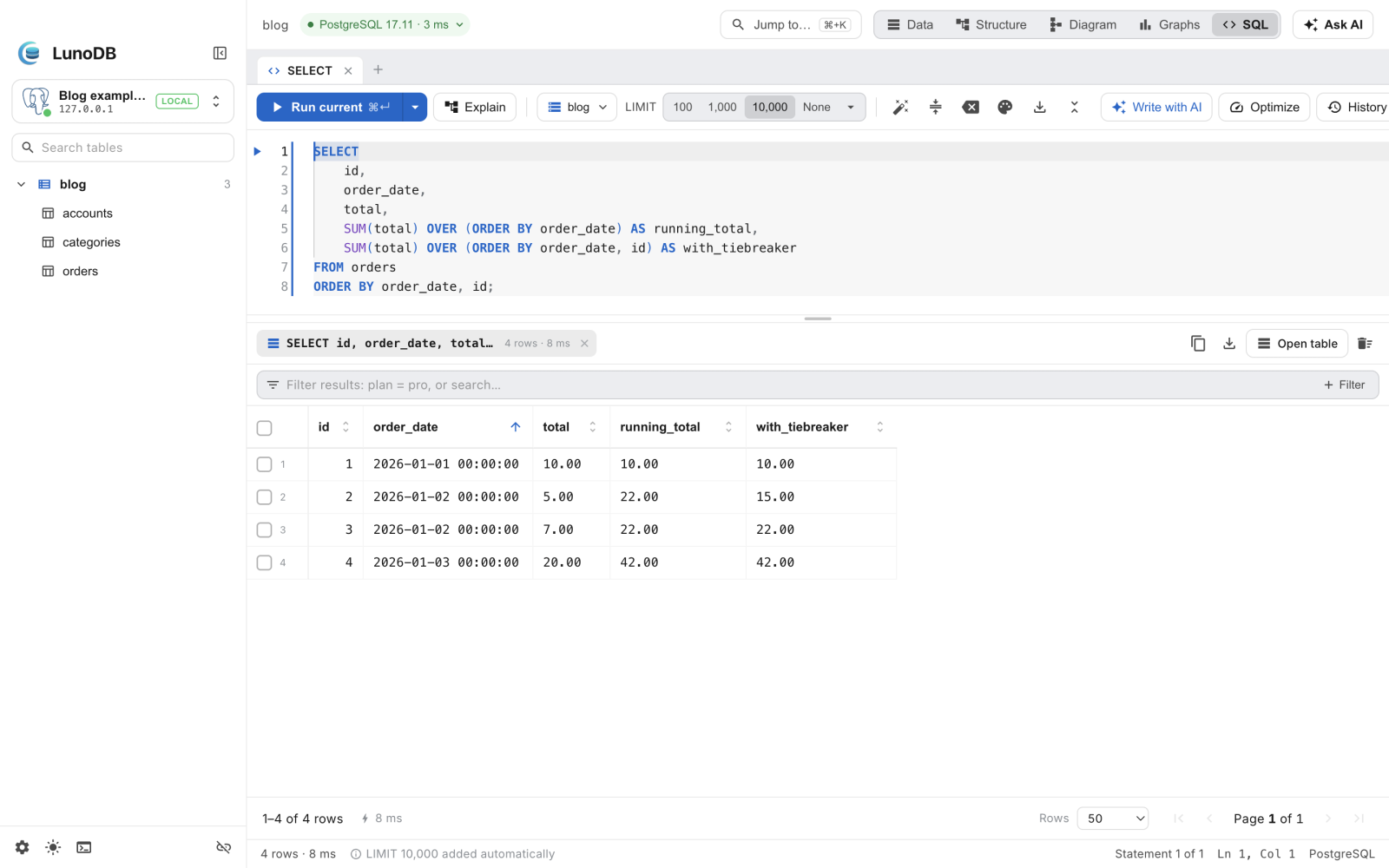
One thing to watch: rows that tie on the ORDER BY column share a running total. Two orders on the same day both show the total after both of them:
| order_date | total | running_total |
|---|---|---|
| 2026-01-01 | 10.00 | 10.00 |
| 2026-01-02 | 5.00 | 22.00 |
| 2026-01-02 | 7.00 | 22.00 |
| 2026-01-03 | 20.00 | 42.00 |
That comes from the default frame, covered under Frame Clauses below. If you want the total to grow one row at a time, add a tie-breaker such as ORDER BY order_date, id.
Comparing Rows with LAG and LEAD
LAG() looks backwards, LEAD() looks forwards. Both are perfect for period-over-period comparisons:
SELECT
    month,
    revenue,
    LAG(revenue) OVER (ORDER BY month) AS previous_month,
    revenue - LAG(revenue) OVER (ORDER BY month) AS change_amount,
    ROUND(
        100.0 * (revenue - LAG(revenue) OVER (ORDER BY month))
        / LAG(revenue) OVER (ORDER BY month),
        1
    ) AS percent_change
FROM monthly_revenue
ORDER BY month;
The first row has no previous month, so LAG() returns NULL. Supply a default as the third argument to avoid that:
LAG(revenue, 1, 0) OVER (ORDER BY month)
That reads as: go back 1 row, and use 0 if there isn't one.
LAG() is also the cleanest way to find gaps in a sequence, measure time between events, or detect when a value changed:
SELECT
    user_id,
    event_time,
    status,
    LAG(status) OVER (PARTITION BY user_id ORDER BY event_time) AS previous_status
FROM user_events;
Keep only the rows where the status changed and you have a change log. As with ranking, the filter has to go outside:
SELECT user_id, event_time, previous_status, status
FROM (
    SELECT
        user_id,
        event_time,
        status,
        LAG(status) OVER (PARTITION BY user_id ORDER BY event_time) AS previous_status
    FROM user_events
) AS changes
WHERE status <> previous_status;
Frame Clauses and Moving Averages
By default, an ordered window covers everything from the start of the partition through the current row, plus any rows that tie with it on the ORDER BY columns. A frame clause lets you change that, which is how you build moving averages:
SELECT
    order_date,
    total,
    AVG(total) OVER (
        ORDER BY order_date
        ROWS BETWEEN 6 PRECEDING AND CURRENT ROW
    ) AS seven_day_average
FROM daily_totals
ORDER BY order_date;
The useful frame boundaries:
ROWS BETWEEN 6 PRECEDING AND CURRENT ROW— the current row plus the six before itROWS BETWEEN 1 PRECEDING AND 1 FOLLOWING— a three-row sliding windowROWS BETWEEN UNBOUNDED PRECEDING AND CURRENT ROW— a running total that grows one row at a time, even through tiesROWS BETWEEN CURRENT ROW AND UNBOUNDED FOLLOWING— everything from here to the end
There's also RANGE instead of ROWS, which works on values rather than row counts. RANGE treats rows with equal ORDER BY values as one unit, which is usually what you want for dates with duplicates. The default frame is in fact RANGE BETWEEN UNBOUNDED PRECEDING AND CURRENT ROW, which is why tied rows share a running total. If you're doing a lot of this, our post on time-series data patterns goes further.
Other Functions Worth Knowing
NTILE(n) splits rows into n roughly equal buckets. Great for quartiles and percentile cohorts:
SELECT
    customer_id,
    lifetime_value,
    NTILE(4) OVER (ORDER BY lifetime_value DESC) AS quartile
FROM customers;
FIRST_VALUE() and LAST_VALUE() grab a value from the edge of the window:
SELECT
    customer_id,
    order_date,
    FIRST_VALUE(order_date) OVER (
        PARTITION BY customer_id ORDER BY order_date
    ) AS first_order_date
FROM orders;
Careful with LAST_VALUE(): because the default frame stops at the current row (and its ties), it returns the current row's value unless you widen the frame:
LAST_VALUE(order_date) OVER (
    PARTITION BY customer_id
    ORDER BY order_date
    ROWS BETWEEN UNBOUNDED PRECEDING AND UNBOUNDED FOLLOWING
)
This is the single most common window function bug. If LAST_VALUE() seems broken, it's the frame.
Naming Windows to Avoid Repetition
Repeating the same OVER (...) clause five times is noisy. Define it once with WINDOW:
SELECT
    month,
    revenue,
    LAG(revenue) OVER w AS previous_month,
    LEAD(revenue) OVER w AS next_month,
    SUM(revenue) OVER w AS running_total
FROM monthly_revenue
WINDOW w AS (ORDER BY month)
ORDER BY month;
Supported in PostgreSQL, MySQL 8.0+, and SQLite 3.25+.
Performance Notes
Window functions are fast, but they aren't free:
- They need sorted data. An index matching your
PARTITION BYandORDER BYcolumns lets the database skip the sort entirely. ForPARTITION BY customer_id ORDER BY order_date, an index on(customer_id, order_date)is ideal. See our guide to indexes for the details. - Filter first. Window functions run over every row that survives the
WHEREclause, so narrow the set before you rank it. - Reuse one window. Multiple functions sharing an identical
OVER()clause are computed in a single pass. Different clauses mean extra sorts. - Check the plan. Look for a sort step feeding the window operation. If you see one, an index can usually remove it. Our guide to reading EXPLAIN plans shows what to look for.
Database Support
| Database | Window functions |
|---|---|
| PostgreSQL | Since 8.4 |
| MySQL | 8.0+ |
| MariaDB | 10.2+ |
| SQLite | 3.25+ |
| SQL Server | 2005+ (frames since 2012) |
| Oracle | Long-standing support |
If you're on MySQL 5.7, window functions aren't available and you'll need self-joins or user variables instead. That's a solid reason to upgrade.
Try It in LunoDB
Window functions are much easier to learn when you can see the output change as you tweak the query. In LunoDB you can:
- Run the statement under the cursor with Cmd/Ctrl + Enter, or the whole script with Cmd/Ctrl + Shift + Enter
- Keep a query tab each for
RANK()andDENSE_RANK()and flip between them - Describe what you want in plain English and let the built-in AI write the window function for you, then study the SQL it produces
- Click Explain to see whether the window is fed by a sort or by an index
- Export the results to CSV to check your running totals in a spreadsheet
That last one is genuinely useful while learning. Ask for "revenue by month with a running total and month-over-month change" and you'll get working SQL you can pick apart.
Conclusion
Window functions solve a class of problem that's awkward or impossible with GROUP BY alone. The pattern is always the same: pick a function, describe the window with PARTITION BY and ORDER BY, and wrap the query if you need to filter on the result.
Start with these three and you'll cover most real work:
ROW_NUMBER()to pick the top N per groupSUM() OVER (ORDER BY ...)for running totalsLAG()for period-over-period comparisons
Download LunoDB and try them against your own data. The concepts stick much faster with real rows in front of you.